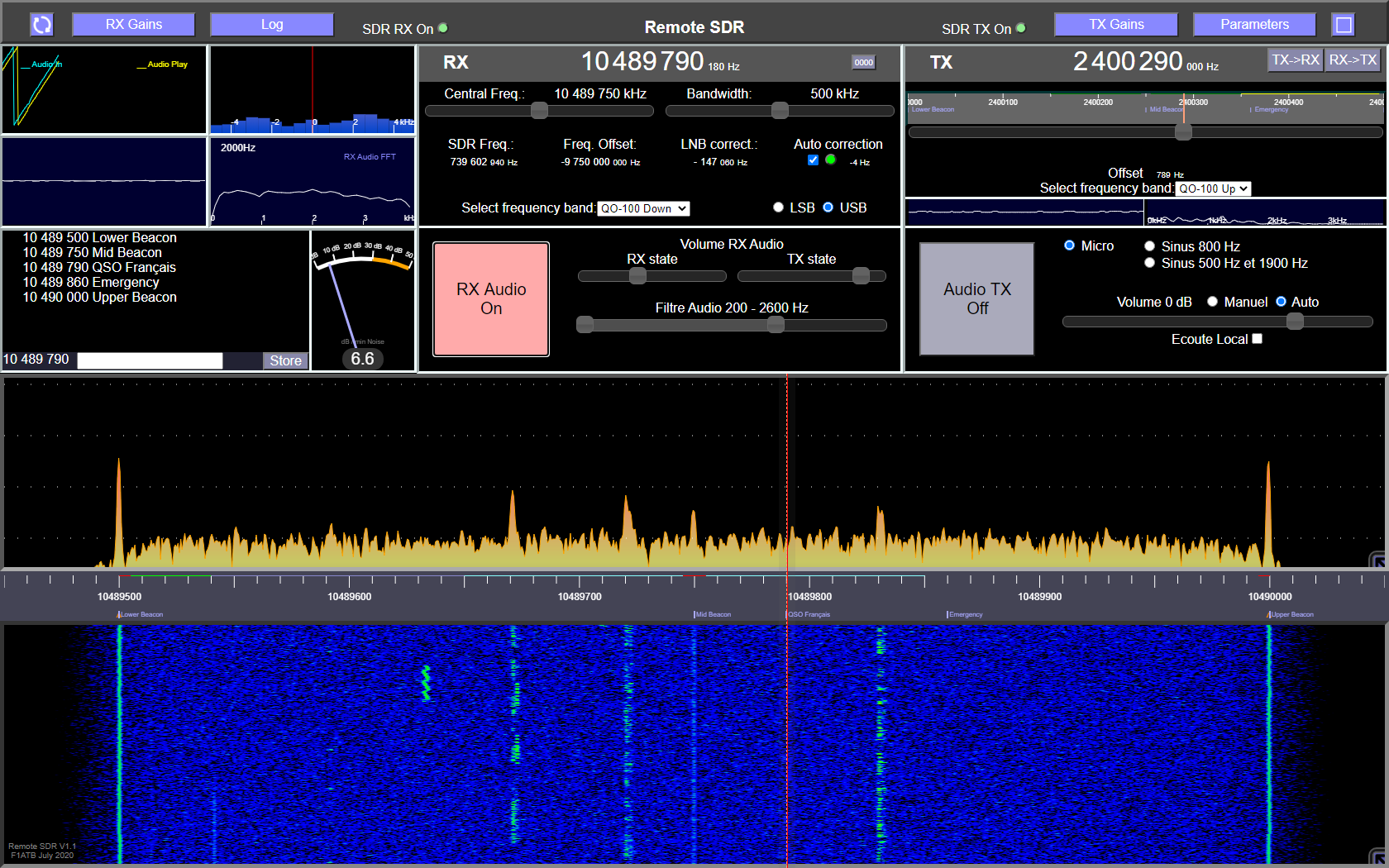
“Remote SDR” is a web application allowing to remotely control an amateur radio transceiver between 1 MHz and 6 GHZ. Its first application was the duplex control of a transceiver dedicated to the QO-100 / Es’Hail 2 geostationary satellite.
The set is made up of:
- a reception channel: SDR (Software Design Radio) + an Orange PI nanoprocessor
- a transmitter channel: SDR + an Orange PI nanoprocessor
- a PC or tablet controlling the SDRs with “Remote SDR” running on a web browser like Chrome or Edge.
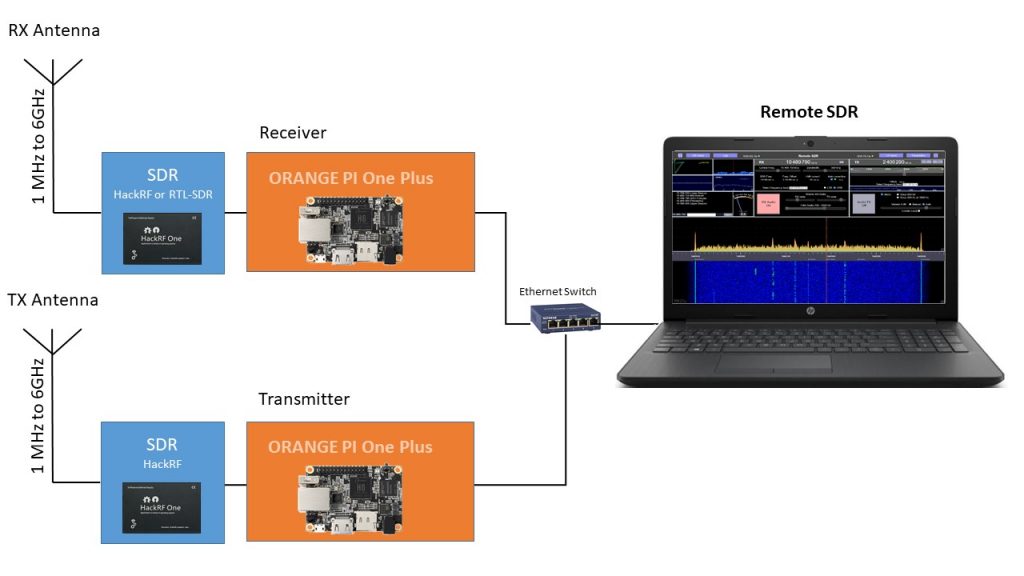
This configuration makes it possible to locate the HF part near the antennas, which is essential for links above GHz. In the transmission chain, amplifiers must be added to bring the HF signal to the desired level. The SDR of the reception chain can be either an Hack RF One or an RTL-SDR depending on the frequency band you want to cover.
The “Orange Pi” are processors similar to the Raspberry Pi running under the Armbian Operating System. They do part of the signal processing.
The reception chain processed in the Orange Pi is described in the article Remote SSB receiver.
The transmission chain processed in the second Orange Pi is described in the article Remote SSB transmitter.
Remote SDR provides the part of the signal processing necessary for data visualization and audio management.
Video – Intro
The code
You can choose between installing the source code yourself on an Orange Pi One Plus or burning an image. Both are available on Github / F1ATB. For installation procedures the following article details them.
Posts on Remote-SDR v1
- Remote SDR V5 -Raspberry 4B or Orange Pi Image Installation
- Remote SDR v5 – Manual Installation
- Remote SDR v5
- QO-100 Satellite Live
- RTTY
- Troubleshooting
- QO-100 Transceiver
- SSTV
- WSJT-X – FT8
- Omnirig – Remote SDR
- Communication Ports
- Tone generators
- Setting of GPIO outputs
- Band Scanning
- Gains and Dynamics
- Frequencies Management
- Launch of Remote SDR
- CPU Cooling
- Web GUI
- Microphone and signal processing authorization
- Configurations
- Characteristics
- Introduction to Remote SDR
- Remote SDR – Audio Channels
- CW with Remote SDR
- Rotary Knob and Morse Manipulator for Remote SDR
- VHF and UHF NBFM Transceiver
- Remote SDR v4
- Gpredict — Remote SDR
- Remote SDR V4 – Raspberry Pi 4B or Orange Pi Zero 2 image installation
- Remote SDR v4 – Manual Installation
- SA818 – RTL-SDR
- Remote SDR – Examples of realization
- Transmit over QO-100 satellite with a Smartphone
- Remote SDR V2 – Software Architecture
- Remote SDR V1- Purchase
- Remote SDR V1 – Man Machine Interface
- Remote SDR V1 – Signal Processing
- Web Client to GNU Radio
- GNU Radio to Web client
- Remote SSB Transmitter
- Remote SSB Receiver
- GPIO on Orange PI One Plus H6
- TCXO installation on HackRF
- Q0-100 Transceiver with 2 SDR – Remote SDR V1
Helle Andre,
Is there a possibility to transmit CW via the HackRF?
73
ON4CGW KURT
Yes it is possible to generate a CW signal with Hack RF. It’s easy to do. I have not yet implemented the function in Remote SDR. It’s on my list of improvements.
Regards
André
Hello André,
congratulations on this very nice project. I have built until now, only the RX part and I’m using raspberry pi4 (2Gb) SBC with RTL-SDR and it seems working very well, I liked the sound, seems stable even accessing by internet, also like the way it works, I mean I only need a browser to work, no program to install. I just followed your setup instructions for the Orange Pi. Waiting now for an HackRF to complete the TX part. I hope you continue with the project …
Regards,
Jacinto
CU2ED
Remote SDR Version 2 is now available. It offers the possibility to connect an Adalm-Pluto SDR, a HackRF One SDR or a RTL-SDR. Modulation proposed are SSB and NBFM and in reception only WBFM and AM also.
https://f1atb.fr/index.php/2021/05/03/remote-sdr-v2-2/